
Effective workplace communication is essential for every successful business. When employees share information clearly, collaborate on tasks, and stay updated on important decisions, teams can work more efficiently and avoid unnecessary confusion.
However, many businesses still depend on scattered emails, phone calls, personal messaging apps, and informal conversations. This can make it difficult to track discussions, share files, and ensure everyone receives important updates.
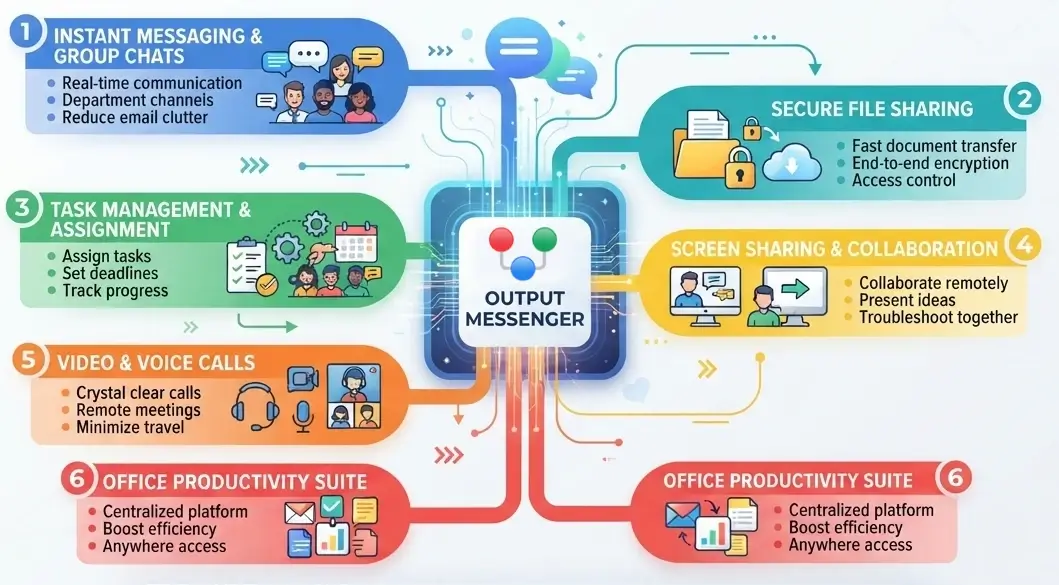
The good news is that a few simple changes can make a significant difference. Here are seven practical ways to improve team communication in the workplace.
1. Set Clear Communication Guidelines
Every team should understand how and when to communicate. Without clear guidelines, employees may miss important messages or spend too much time checking different communication channels.
Establish simple rules for your workplace:
- Use team chats for quick questions and daily updates.
- Use group discussions for project-related conversations.
- Share important announcements through an official channel.
- Use meetings for discussions that require detailed explanations.
- Set clear expectations for responding to urgent messages.
Clear communication guidelines help employees stay organized and understand where to find the information they need.
2. Use Team Communication Software
Using multiple communication tools can make workplace collaboration difficult. Important information may get lost in email threads, and employees may struggle to find previous conversations.
Team communication software brings conversations into one organized environment. Employees can send instant messages, create group discussions, share files, and coordinate their work more easily.
When choosing an office chat software solution, consider features such as:
- One-to-one and group messaging
- Organized chat rooms
- File sharing and transfer
- Voice and video calls
- Message history and search
- Task management and reminders
A centralized communication platform helps teams stay connected and reduces the need to switch between multiple applications.
3. Encourage Open and Respectful Communication
Good workplace communication is not just about sending messages. It also involves listening, asking questions, and sharing ideas respectfully.
Encourage employees to express their opinions, ask for clarification, and share feedback when needed. Managers should make sure team members feel comfortable raising concerns before small problems become bigger issues.
Simple practices, such as acknowledging messages and responding politely, can help build trust and strengthen relationships between colleagues
4. Keep Team Conversations Organized
When every discussion happens in the same chat window, important information can become difficult to find.
Organize conversations according to departments, projects, or teams. For example, a sales team can have a dedicated discussion space for customer updates, while a development team can use another space for project coordination.
Use descriptive group names and keep discussions focused on their purpose. Share relevant documents in the appropriate conversations so team members can access information when they need it.
Organized communication makes collaboration easier, especially when multiple teams are working on different projects.
5. Prioritize Secure Business Communication
Businesses often share confidential information through internal messages, including project documents, customer details, financial information, and operational updates.
Using personal messaging applications without clear security policies can make it harder for organizations to manage access to business conversations and information.

To improve communication security:
- Choose communication software with appropriate encryption and security controls.
- Give employees access based on their roles and responsibilities.
- Use strong authentication practices.
- Establish clear rules for sharing confidential files.
- Review user access when employees change roles or leave the organization.
For organizations that need greater control over their communication environment, self-hosted office chat software can be worth considering. Evaluate hosting, access controls, encryption, and data management options according to your business requirements.
6. Support Remote and Hybrid Teams
Modern teams may work from different offices, cities, or countries. Without reliable communication tools, remote employees can miss updates and feel disconnected from their colleagues.
Provide a consistent way for employees to communicate across locations and devices. Use group chats for project updates, video calls for discussions, and shared files for collaboration.
Document important decisions and action items so employees who cannot attend a meeting can still understand what happened.
A well-organized communication process helps office-based and remote employees work toward the same goals.
7. Review and Improve Your Communication Process
Workplace communication should improve as your business grows. Regularly ask employees what is working and where they experience difficulties.
Consider questions such as:
- Are important messages reaching the right people?
- Can employees easily find previous conversations and shared files?
- Are meetings being used effectively?
- Do teams have too many separate communication tools?
- Are employees following security guidelines?
Use the feedback to improve your communication practices and choose tools that meet your team’s needs.
Choose the Right Office Chat Software for Your Team
Improving workplace communication requires clear guidelines, organized discussions, secure information sharing, and reliable collaboration tools.
Output Messenger is secure office chat software designed for team communication. It offers instant messaging, group chats, voice and video calls, file sharing, task management, and other collaboration features in one platform.
Businesses can also choose self-hosted deployment options to maintain greater control over their communication environment, depending on their requirements.
Whether your team works in one office or across multiple locations, the right communication software can help employees stay connected and collaborate more effectively.
Ready to improve your team’s communication?
Explore Output Messenger to learn more about its features, or visit the Output Messenger Downloads page to get started.