
Effective communication is essential for every growing business. As organizations expand across departments, branches and remote locations, managing internal communication becomes increasingly challenging.
Employees often depend on multiple communication tools for instant messaging, file sharing, voice calls and video meetings. This can lead to scattered information, communication delays and difficulties managing company data.
Enterprise Messaging Software provides a centralized communication platform that helps businesses connect employees, manage conversations and improve collaboration while maintaining control over their business information.
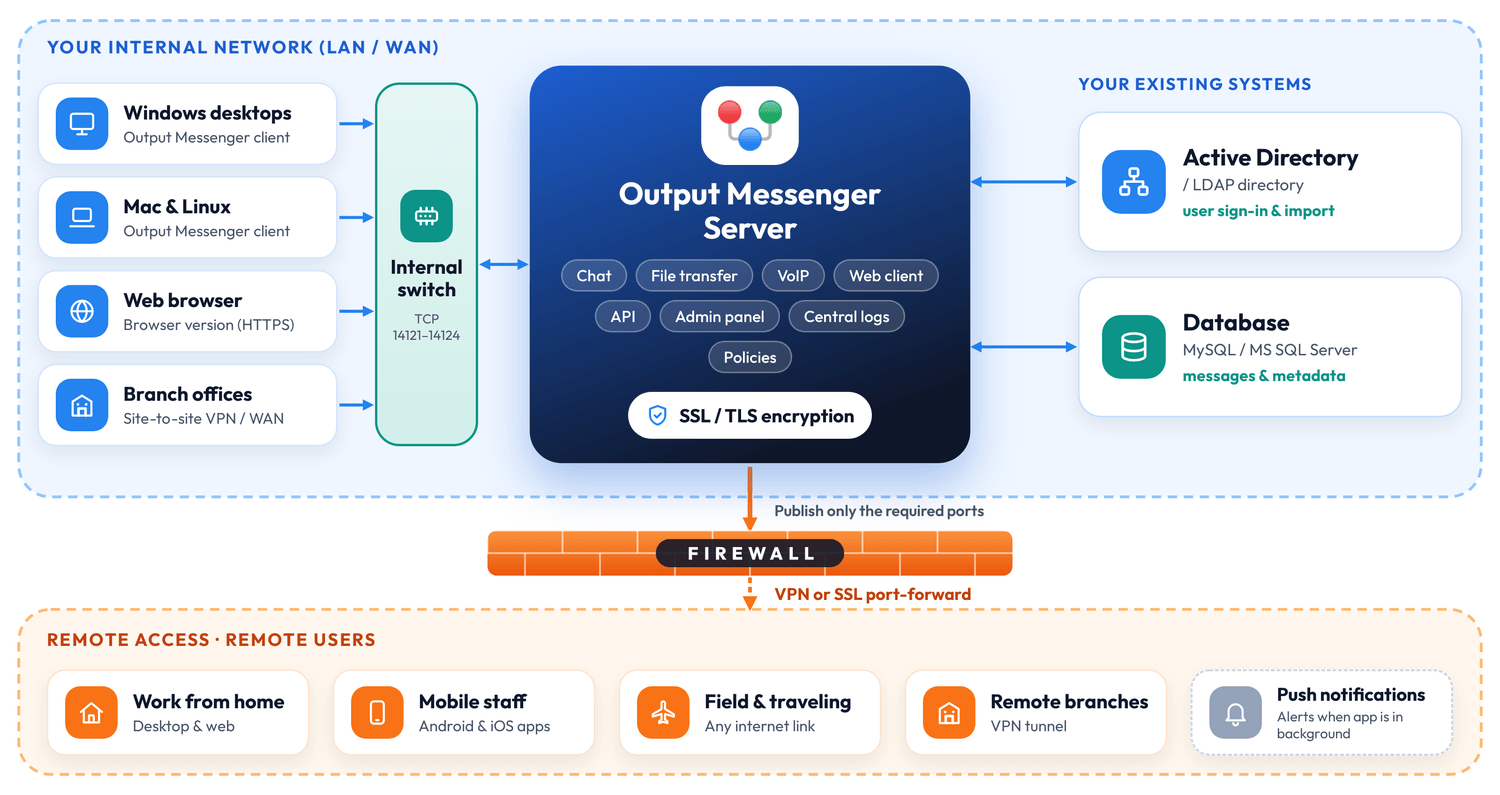
In this guide, let’s explore what enterprise messaging software is, its important features and how businesses can choose the right solution.
What Is Enterprise Messaging Software?
Enterprise messaging software is a business communication platform designed to connect employees, departments and teams through a centralized system.
Unlike ordinary messaging applications, enterprise messaging solutions provide advanced administration, security and deployment options to meet organizational requirements.
Businesses can use enterprise messaging software for:
- Instant messaging between employees and departments.
- Group chats and dedicated team chat rooms.
- Secure file sharing and document collaboration.
- Voice calls and video conferencing.
- Company-wide announcements and notifications.
- Centralized user and department management.
- Communication between office-based and remote employees.
These capabilities help organizations maintain consistent communication and improve workplace productivity.
Why Do Businesses Need Enterprise Messaging Software?
As a company grows, communication through personal messaging applications and scattered email conversations may no longer be sufficient.
1. Disconnected Department Communication
Different departments often use separate communication tools, making it difficult to share information and coordinate activities.
An enterprise messenger provides a centralized platform where employees can communicate through individual chats, group conversations and dedicated chat rooms.
2. Lack of Data Control
Using public cloud messaging applications may raise concerns about where company conversations and files are stored.
A self-hosted enterprise messaging solution allows businesses to store communication data on their own servers and manage it according to internal policies.
3. Difficult Employee Management
Managing employee accounts individually becomes time-consuming as organizations expand.
Integration with Active Directory or LDAP helps IT administrators import users and simplify employee authentication and management.
4. Remote Team Communication Challenges
Employees working from different branches, offices or home locations need reliable access to business communication tools.
Enterprise messaging software connects employees through desktop, web and mobile applications, helping teams stay connected wherever they work.
5. Too Many Communication Tools
Using separate applications for chat, file sharing, voice calls and video meetings can increase costs and reduce productivity.
An integrated enterprise communication platform brings essential communication features together in one application.
Important Features of Enterprise Messaging Software
When selecting an enterprise messaging solution, businesses should consider the following features.
Instant Messaging and Group Chats
Employees should be able to communicate instantly through private messages, group conversations and department-based chat rooms.
Secure File Sharing
Sharing documents, images and other business files should be simple and secure, with appropriate administrative controls.
Voice and Video Calls
Built-in voice calls, video calls and conferencing help teams communicate effectively without depending on multiple applications.
Self-Hosted Server Deployment
Self-hosted messaging allows organizations to install the communication server on their own infrastructure, providing greater control over business data and deployment.
Active Directory and LDAP Integration
Integration with existing directory services simplifies user authentication, employee imports and department management.
Centralized Administration
IT administrators should have the ability to manage users, departments, permissions and communication policies from a central administration interface.
Cross-Platform Compatibility
Enterprise messaging software should support different operating systems and devices so employees can communicate using Windows, Mac, Linux, web browsers and mobile devices.
How to Choose the Right Enterprise Messaging Solution
Before selecting an enterprise messenger, evaluate the following points:
- Security: Check encryption, authentication and administrative security controls.
- Data Ownership: Understand where messages and shared files are stored.
- Scalability: Choose a solution that can support your growing workforce.
- Integration: Check compatibility with Active Directory, LDAP and existing business systems.
- Platform Support: Ensure employees can access the software across desktop and mobile devices.
- Communication Features: Look for messaging, file sharing, voice calls and video conferencing.
- Deployment Options: Consider whether self-hosted or cloud deployment better suits your organization.
- Licensing: Compare subscription costs and one-time licensing options.
Choosing the right platform can help businesses establish a more organized and reliable communication environment.
How Output Messenger Supports Enterprise Communication
Output Messenger is an enterprise messaging and team communication solution designed to help organizations manage internal communication from one platform.
It supports self-hosted deployment, allowing businesses to install the server on their own infrastructure and maintain control over their communication data.
Key capabilities include:
- Unified Team Communication: Connect employees through private chats, group chats, chat rooms and announcements.
- Self-Hosted Deployment: Host the messaging server on your own infrastructure.
- Active Directory / LDAP Integration: Simplify employee authentication and user management.
- Secure Messaging and File Sharing: Manage business conversations and file transfers with centralized administrative controls.
- Voice and Video Communication: Connect employees through voice calls, video calls and conferencing.
- Cross-Platform Access: Support for Windows, Mac, Linux, web browsers, Android and iOS.
- Centralized Administration: Manage employees, departments, permissions and communication settings.
Whether your organization operates from a single office or multiple locations, Output Messenger helps bring employees together through a centralized enterprise communication platform.
Choosing the right enterprise messaging software helps businesses improve team communication, simplify collaboration and maintain better control over business data.
Output Messenger offers a secure, self-hosted communication solution to keep your teams connected and productive.